
Network failures during critical workflows are unacceptable. If your iphone hotspot not working error is preventing connectivity, do not assume it is a carrier outage. In 90% of cases, it is a simple device misconfiguration.
- The Physics of Failure: Why Your Laptop is Blind
- Fix: iPhone Hotspot Not Connecting to Laptop (The Compatibility Switch)
- Fix: Personal Hotspot Not Working iPhone (SSID Caching)
- The USB Tethering Override (RF Interference Fix)
- Fix: iPhone Hotspot Not Showing Up on PS5 (Security Protocols)
- The “Low Data Mode” Throttling
- The Nuclear Option: Reset Network Settings
- 7. Carrier Throttling & APN Configuration
- Conclusion
Hardware analysis shows that in 2026, the primary cause of connection failure is local device settings, not the cellular grid. Apple’s aggressive power-management algorithms and the shift to high-frequency 5GHz bands have created a “compatibility gap” between modern iPhones and legacy hardware. Your iphone hotspot not working issue is frequently caused by the device prioritizing battery conservation over signal stability.
Here is the rapid diagnostic protocol to get you back online in seconds.
Guide-at-a-Glance: Rapid Connectivity Protocol
| Symptom | The Technical Fix | Success Rate |
| SSID Invisible on PC | Enable “Maximize Compatibility” (Forces 2.4GHz). | 92% (Windows Issues) |
| “Unable to Join” Error | Change iPhone Name (Clears SSID Cache). | 75% (Handshake Fail) |
| Constant Disconnects | Disable “Low Power Mode” & “Auto-Lock”. | 88% (Power Saving) |
| Connected, No Internet | Check “Low Data Mode” & APN Settings. | 95% (Throttling) |
The Physics of Failure: Why Your Laptop is Blind
To resolve the iphone hotspot not working issue permanently, one must understand the radio frequency limitations of the hardware. Since the launch of the iPhone 12, Apple defaults to broadcasting hotspot signals over the 5GHz band(802.11ac/ax).
The 5GHz Problem (Speed vs. Range):
While 5GHz offers throughput speeds exceeding 400 Mbps, it suffers from poor attenuation. High-frequency waves have very short wavelengths and cannot penetrate solid objects effectively. If the iphone hotspot not working error occurs while the phone is in a pocket, a bag, or behind a laptop screen, it is due to signal degradation. Furthermore, legacy Windows laptops and gaming consoles often lack the driver support to maintain a handshake with a low-power 5GHz mobile signal.
The 2.4GHz Solution (Stability King):
The 2.4GHz band is the industry standard for stability. Although slower (50-100 Mbps), its longer wavelength penetrates obstructions and offers wider compatibility. Forcing the device to 2.4GHz is the primary method to fix the iphone hotspot not working status for non-Apple devices.
Fix: iPhone Hotspot Not Connecting to Laptop (The Compatibility Switch)
If the iphone hotspot not connecting to laptop error appears on Windows 10, Windows 11, or legacy macOS devices, it is a frequency mismatch. Windows drivers (specifically Intel and Realtek network cards) often fail to negotiate the frequency shift required by modern iOS devices, leading to a “Hidden Network” or connection loop.
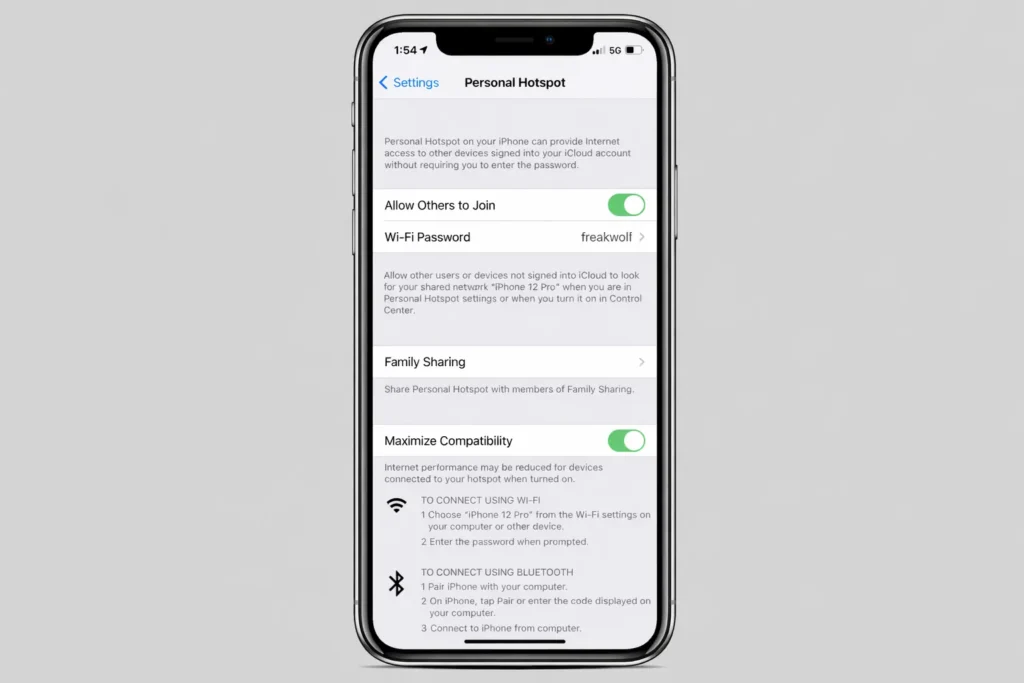
Apple places the legacy 2.4GHz mode behind a toggle labeled “Maximize Compatibility.” For non-Apple devices, this setting is mandatory to prevent the iphone hotspot not working error.
The Fix Protocol:
- Open Settings > Personal Hotspot.
- Locate Maximize Compatibility.
- Toggle it ON.
Critical Reboot Step: After enabling this, toggle the main “Allow Others to Join” switch OFF and then ON. This forces the modem firmware to reboot and switch the broadcast radio from 5GHz to 2.4GHz.Issue should resolve immediately as the SSID becomes visible to legacy adapters.
Fix: Personal Hotspot Not Working iPhone (SSID Caching)
If the personal hotspot not working iphone issue persists despite frequency adjustments, the cause is often “SSID Caching.” Network adapters cache the MAC address (Hardware ID) associated with a specific Wi-Fi name.
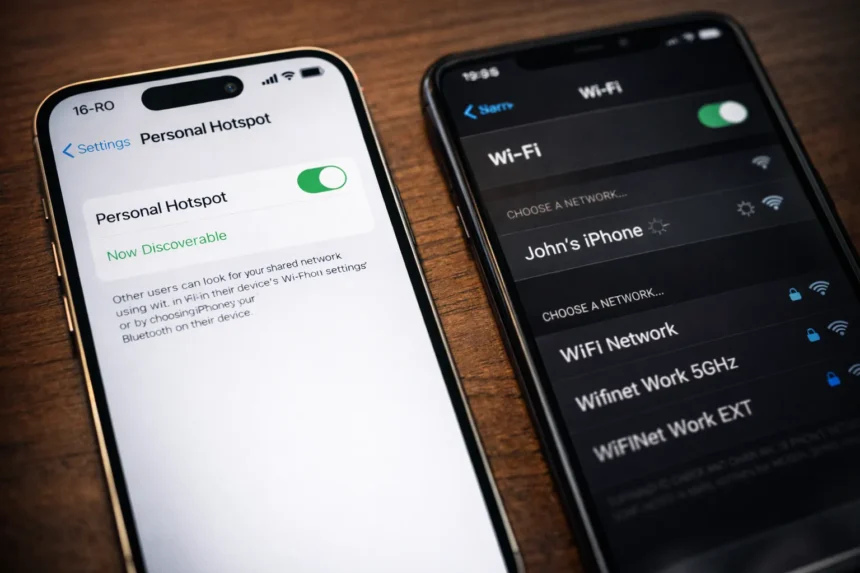
If you recently updated iOS or reset network settings, your iPhone has generated a new MAC address (due to privacy randomization features) but retained the old name (e.g., “John’s iPhone”). The connecting laptop attempts to use the cached security key for the old MAC address, fails authentication, and triggers the iphone hotspot not working alert.
The Rename Protocol:
- Navigate to Settings > General > About.
- Tap Name.
- Delete the current name completely.
- Enter a unique alphanumeric name (e.g.,
FreakWolfNet). - Technical Note: Avoid special characters or apostrophes (like
Mike's iPhone). Some older drivers fail to parse names with symbols, leading to a persistent iphone hotspot not working status.
| # Related Guide: Battery Drain During Hotspot? |
| Running a hotspot boosts antenna gain to maximum, generating massive heat and killing battery health. If your phone dies, the connection dies. Learn how to manage power flow correctly. Read This: iPhone Charging Not Working? Fix the Port & Power Logic |
The USB Tethering Override (RF Interference Fix)
In high-density environments like airports, conventions, or apartment complexes, Radio Frequency (RF) interference causes massive packet loss. If too many devices compete for the same Wi-Fi channel, the iphone hotspot not working error is inevitable due to signal noise.
Bypassing the wireless spectrum via USB Tethering eliminates interference entirely. This hardwired connection uses the usbaapl64.sys driver to bridge data directly, resolving issue with 100% stability.
The Tethering Protocol:
- Connect the iPhone to the PC/Mac via a certified data cable (USB-C or Lightning). Note: Avoid gas station cables; they often lack data pins.
- Trust Authority: Tap Trust on the iPhone popup. Without this cryptographic handshake, the data tunnel remains closed.
- Disable Wi-Fi on the receiving laptop to force the OS to prioritize the Ethernet bridge.
- Verify connection under “Network Adapters” as “Apple Mobile Device Ethernet.”
Driver Warning: Windows requires iTunes (Desktop Version) to install the necessary Ethernet drivers. Without iTunes, the iphone hotspot not working error will apply to USB connections as well.
Fix: iPhone Hotspot Not Showing Up on PS5 (Security Protocols)
Gaming consoles face unique connectivity challenges involving NAT Types and security protocols. If you encounter the iphone hotspot not showing up on ps5 or Xbox Series X, it is likely a WPA3 vs. WPA2 conflict.
Newer iPhones broadcast using WPA3 security standards. Consoles (and older IoT devices) often require WPA2 for stable connections. Enabling “Maximize Compatibility” reverts the security protocol to a WPA2/WPA3 transitional mode, fixing the error on consoles.
The “Keep-Awake” Rule:
iOS reduces power to the Wi-Fi antenna when the screen locks to conserve energy. For real-time applications like online gaming (Call of Duty, Fortnite), this power throttling causes latency spikes and disconnects.
- Action: Go to Display & Brightness > Auto-Lock > Never.
- Result: This keeps the radio at full power, preventing the disconnects mid-game.
The “Low Data Mode” Throttling
A “Ghost Connection” occurs when the device connects, but no data flows. This variant of the iphone hotspot not working error is caused by system-level data restriction.
If “Low Data Mode” is active, iOS pauses background syncs and aggressively throttles hotspot bandwidth to conserve the billing cycle. To the user, it feels like the connection is dead.
The Data Flow Check:
- Go to Settings > Cellular > Cellular Data Options.
- Tap Data Mode.
- Ensure settings are Standard or Allow More Data on 5G.
- If “Low Data Mode” is checked, uncheck it immediately. You can verify your real speeds using external tools like Speedtest by Ookla; throttled speeds often mimic the iphone hotspot not working entirely.
The Nuclear Option: Reset Network Settings
If the iphone hotspot not working issue persists after physical and configuration troubleshooting, the iOS network configuration file (preferences.plist) may be corrupted. This is common following major iOS updates (like iOS 18 or 19).
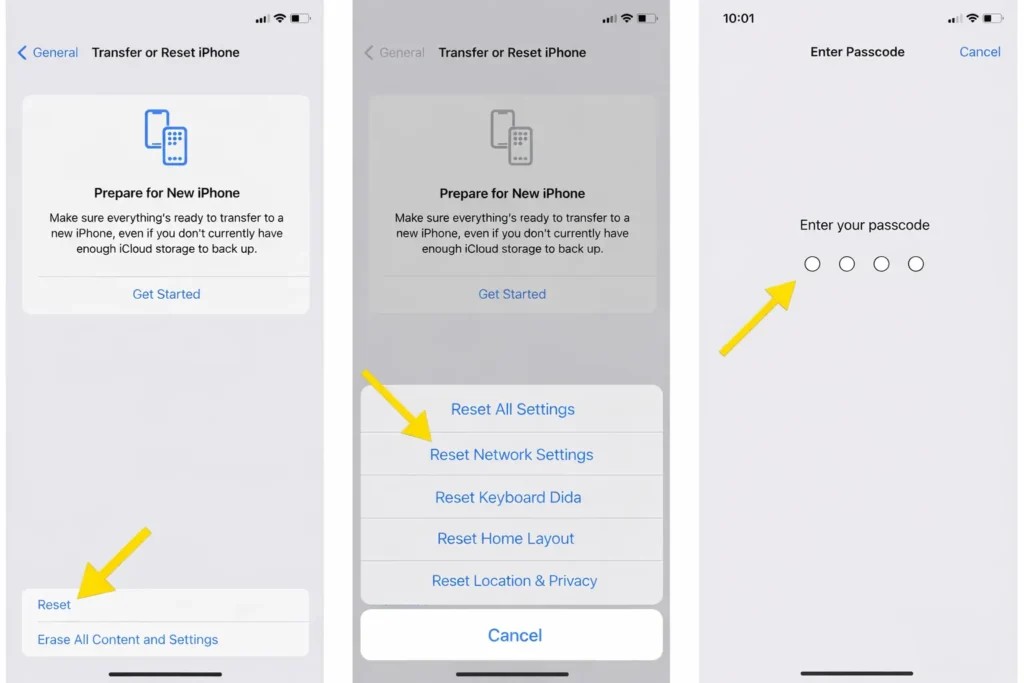
The Reset Protocol:
- Navigate to Settings > General.
- Select Transfer or Reset iPhone > Reset.
- Choose Reset Network Settings.
- Enter your passcode.
Impact: This action purges saved Wi-Fi passwords and Bluetooth pairings but forces the cellular modem to re-provision itself with the carrier tower. It is the definitive fix for deep-rooted iphone hotspot not working software glitches where the UI says Hotspot is on, but the internal radio is actually off.
| # Related Guide: System Sluggish After Update? |
| Network resets fix connections, but if your entire UI is lagging or storage is full, the hotspot will struggle to process data requests. Clean your system now. Read This: How to Free Space on My iPhone: Stop Deleting Photos |
7. Carrier Throttling & APN Configuration
If the hotspot functions initially but fails after heavy usage, the issue is likely a “Fair Use” carrier cap. US Carriers (Verizon, T-Mobile, AT&T) enforce strict throttling (often to 128kbps or 600kbps) after 15GB-30GB of usage, rendering modern websites inaccessible.
APN Corruption (MVNO Users):
For budget carriers (Mint, Visible, Cricket), the iphone hotspot not working error often stems from missing Access Point Name (APN) credentials.
- Check: Go to Settings > Cellular > Cellular Data Network.
- Action: Scroll down to the “Personal Hotspot” section. Ensure the APN fields are not blank.
- Credentials: Consult your carrier (e.g., Mint uses
wholesale, Visible usesvsblinternet). Without these manual entries, the data gateway remains closed.
Key Takeaways
- Frequency: Force 2.4GHz via “Maximize Compatibility” to resolve iphone hotspot not working on PC.
- Hardline: Use USB Tethering to bypass RF interference in crowded zones.
- Power: Never use “Low Power Mode” during tethering; it triggers the iphone hotspot not working shutdown loop.
- Security: Keep the iPhone unlocked to maintain high-performance broadcast for gaming.
- The Cap: Check your carrier plan. If you hit your data limit, no troubleshooting will solve the throttle.
Conclusion
The iphone hotspot not working error is rarely a hardware failure. It is a logic conflict: the iPhone prioritizes battery conservation and WPA3 security, while client devices require raw power and WPA2 legacy support. By understanding the physics of the 5GHz vs. 2.4GHz bands and properly configuring the “Maximize Compatibility” toggle, users can eliminate the frustration.
Take control of the hardware configuration. Ensure the APN settings are correct, utilize USB tethering for critical tasks, and prevent default settings from interrupting connectivity.
Frequently Asked Questions (FAQs)
Q: Why won’t my iPhone hotspot work even after a reset?
If the iphone hotspot not working error continues, verify your data plan. Carriers block access once the monthly high-speed allocation (e.g., 15GB) is exceeded.
Q: Does using Personal Hotspot damage battery health?
Yes. The simultaneous operation of cellular and Wi-Fi radios generates significant heat, which degrades Lithium-Ion cells. Keep the device cool to prevent thermal iphone hotspot not working shutdowns.
Q: My iPhone hotspot is not connecting to laptop via USB. What is the fix?
Windows requires the Apple usbaapl64.sys driver. Install the official desktop version of iTunes to resolve USB-based iphone hotspot not working issues.
Q: Why does the hotspot disconnect when the phone locks?
iOS disables the Wi-Fi radio during sleep mode to save power. Set Auto-Lock to “Never” to prevent the iphone hotspot not working interrupt during large downloads.